Automated regression testing software: Accelerate QA and reliability
Choose automated regression testing software to speed QA, boost reliability, and streamline CI/CD; discover the right tool for your team today.
Compare QA automation tools by workflow. Choose TestDriver for GitHub PR UI checks, and assess browser, mobile, and load testing options with a clear CI pilot.
Automate and scale manual testing with AI ->
Best overall for GitHub pull-request UI checks: TestDriver. Best for code-owned browser testing: Playwright. Best for native mobile testing: Appium. This guide compares QA automation tools by the engineering workflow each serves, including browser regression tests, desktop sandbox execution, and load testing.
TL;DR
A browser test, a native mobile test, and a load test answer different questions. Treating them as interchangeable creates coverage gaps: a successful browser checkout does not establish how checkout behaves under concurrent traffic.
For your 2026 shortlist, start with the failure you need to prevent. Then choose the execution environment and assertions that expose it. A tool belongs in your pipeline because it catches a defined class of regression, not because it appears on every comparison page.
Use these criteria before reading the rankings:
These criteria favor fit over breadth. For a 2026 engineering team, adding another runner without assigning ownership is not a testing strategy.
The order below starts with pull-request UI regression detection, then separates the alternatives by their strongest use case. It is not a claim that a load-testing tool can replace a browser-testing framework.
| Tool | Best for | Standout capability | Key limitation |
|---|---|---|---|
| TestDriver | GitHub pull-request UI checks | Automatically runs pull requests in a real desktop sandbox | UI regression checks do not establish system behavior under load |
| Playwright | Code-owned cross-browser regression suites | Browser automation across Chromium, Firefox, and WebKit | Engineers must maintain test logic and fixtures |
| Cypress | Interactive browser-test development | Browser-focused runner with command-level debugging | Not a native mobile application testing framework |
| Selenium | Existing WebDriver-based estates | Standards-based browser automation across language bindings | Requires choices around runners, assertions, and reporting |
| Appium | Native and hybrid mobile application testing | Driver-based automation for mobile application interfaces | Device configuration and driver compatibility require attention |
| Grafana k6 | Scripted service load testing | Virtual-user workloads and threshold-based checks | Protocol-level tests do not prove UI correctness |
TestDriver automatically runs pull requests in a real desktop sandbox to catch UI regressions. Its stated focus is end-to-end testing and automated code review for software development teams using GitHub.
That makes the workflow, not a generic feature checklist, the reason to evaluate it. Start with changes that affect visible behavior, such as a form submission, a settings interaction, or movement between application screens.
Pros:
Cons:
Best for: GitHub engineering teams that want pull-request changes exercised through the interface.
TestDriver is the best fit among these QA automation tools for GitHub teams prioritizing sandbox-based UI regression checks.
Verdict: Buy, choose it for the pull-request UI workflow, while retaining lower-level tests.
Playwright automates Chromium, Firefox, and WebKit. Playwright Test provides a test runner with fixtures, assertions, and browser-testing features that engineers can keep alongside application code.
Choose it when developers want explicit control over interactions and expected results. A useful test asserts the business outcome after an action, not merely that a button accepted a click.
Playwright pros:
Playwright cons:
Best for: Development teams building and maintaining code-first browser regression suites.
Verdict: Buy, choose Playwright when explicit browser assertions and developer ownership are priorities.
Cypress supports browser end-to-end testing and component testing. Its runner exposes commands and application state during test execution, giving developers an interactive way to investigate browser behavior.
Evaluate it against the way your frontend team works. Component checks can isolate an interface state; end-to-end checks establish whether the connected application completes the intended journey.
Cypress pros:
Cypress cons:
Best for: Frontend teams that prioritize interactive test development and debugging.
Verdict: Buy, choose Cypress when its browser-development workflow fits your team’s daily work.
Selenium WebDriver provides browser automation through language bindings and browser drivers. Selenium Grid supports distributing browser sessions across execution environments.
Selenium is a practical choice when your organization already has WebDriver tests, shared libraries, and engineers who maintain them. Replacing that estate needs a demonstrated workflow benefit, not a preference for a newer tool.
Selenium pros:
Selenium cons:
Best for: Organizations extending an established, multi-language WebDriver testing estate.
Verdict: Hold, retain Selenium when the existing suite provides useful coverage and remains maintainable.
Appium uses a driver-based architecture to automate application interfaces, including Android and iOS applications. It addresses native mobile interactions that a browser-only test does not exercise.
Select mobile journeys based on product risk. Authentication, permissions, and application lifecycle behavior deserve explicit scenarios when your app depends on them.
Appium pros:
Appium cons:
Best for: Engineering teams shipping native or hybrid mobile applications.
Verdict: Buy, choose Appium when the regression exists inside the mobile application, not just its website.
Grafana k6 runs scripted workloads against services and supports thresholds that define acceptable results. Its virtual-user model lets engineers describe concurrent activity rather than executing a single functional journey.
Use it to answer performance questions with explicit workload assumptions. A passing result only applies to the script, environment, traffic pattern, and thresholds used in that run.
Grafana k6 pros:
Grafana k6 cons:
Best for: Teams adding repeatable service-performance checks to engineering delivery.
Verdict: Buy, choose Grafana k6 for load testing, alongside functional regression coverage.
Use a small, controlled pilot before making a 2026 tooling decision. The following quantities define a suggested evaluation exercise, not measured product results: select 3 workflows, run them against 5 pull requests, and repeat each candidate’s baseline for 2 CI runs.
Keep the application revision, environment configuration, and expected outcomes consistent across candidates wherever their scopes overlap.
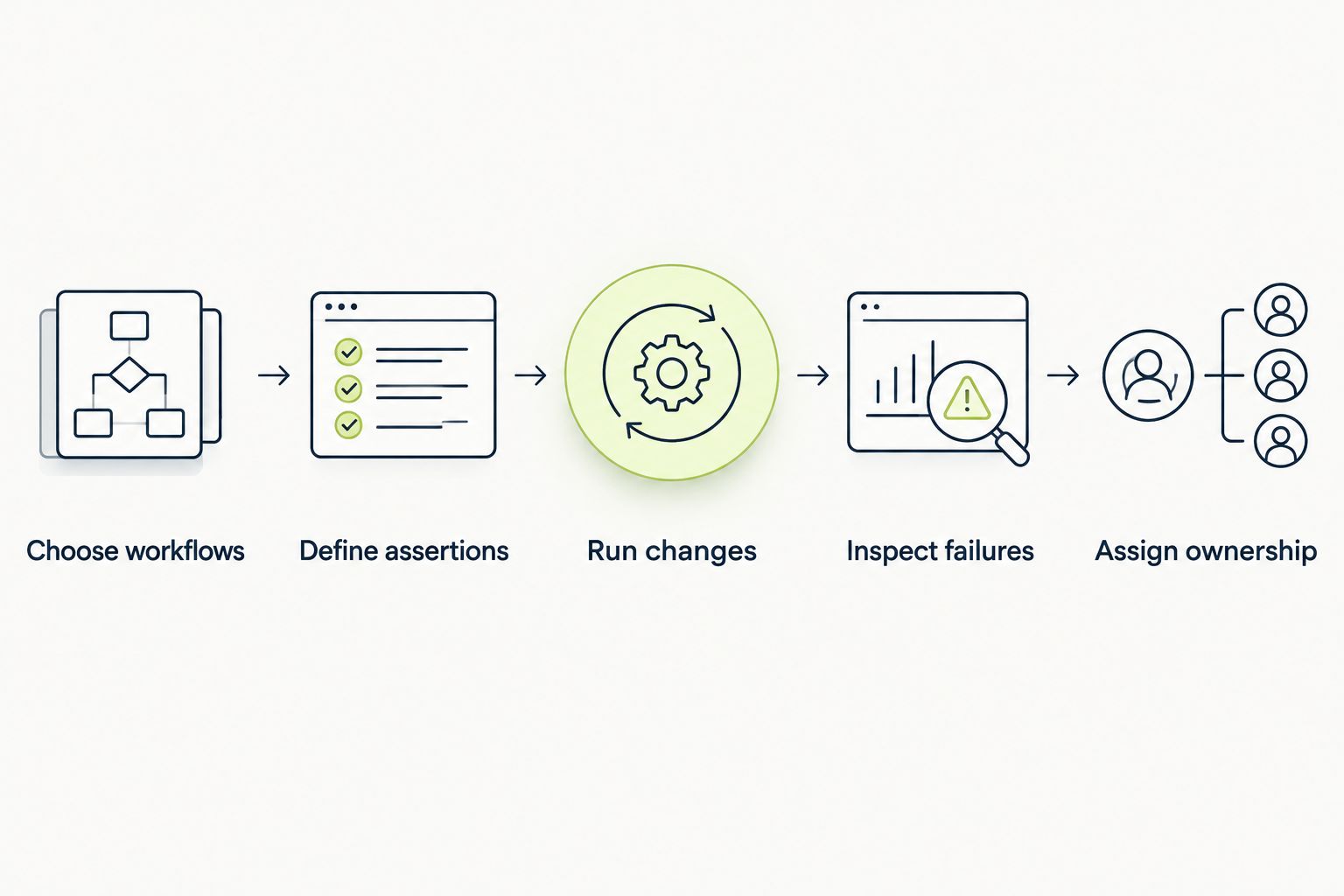
A useful pilot evaluates failure diagnosis and ownership, not just successful execution.
Record what each tool catches and what developers need to diagnose a failure. Also record maintenance work during the pilot; a test that passes initially but becomes difficult to update creates a different engineering burden.
For pipeline-specific selection, compare these requirements with the guide to test automation tools for DevOps pipelines.
These recommendations rank workflow fit, not benchmark performance. The comparison uses each tool’s established execution model and the stated product scope for the client platform.
The criteria are execution fit, failure evidence, assertion control, CI integration, maintenance ownership, and coverage boundaries. No execution-speed, defect-detection, or maintenance-saving score is assigned without supporting measurements.
For a 2026 decision, require a pilot in your own delivery environment. A browser framework and a load-testing runner should not receive a shared numerical score for solving different problems.
Choose TestDriver first if your immediate gap is GitHub pull-request UI regression checking in a desktop sandbox. Choose Playwright for a code-owned browser suite, or Cypress when interactive browser-test development drives your selection.
Keep Selenium when your existing WebDriver investment remains useful. Add Appium for native mobile coverage and Grafana k6 for service load testing; neither substitutes for browser regression assertions.
Your 2026 default should be the smallest set of tools that covers your actual failure surfaces. Do not add overlapping runners without identifying the distinct coverage or workflow benefit each provides.
What’s the best QA automation tool for GitHub pull requests?
TestDriver is the best fit in this shortlist for GitHub teams prioritizing UI regression checks in a real desktop sandbox. It automatically runs pull requests and combines end-to-end testing with automated code review.
Is Playwright better than Cypress for browser testing?
Playwright is the better fit when cross-browser engine coverage and explicit code-owned automation drive the decision. Cypress fits teams prioritizing its interactive browser runner and component-testing workflow; evaluate both against the same application journeys.
Should an engineering team replace Selenium?
Keep Selenium when its existing tests provide useful coverage and remain maintainable. Replace it only after a pilot demonstrates a concrete improvement in authoring, diagnosis, or operational ownership.
Can browser automation tools test native mobile apps?
Browser automation does not establish correctness inside a native mobile application. Use a native mobile automation framework such as Appium for application interfaces and platform-specific interactions.
Can Grafana k6 replace end-to-end regression tests?
Grafana k6 load tests do not replace end-to-end functional regression assertions. Load tests evaluate behavior under a defined workload, while functional tests establish whether the intended journey produces the correct result.
How should teams compare QA automation tools in 2026?
Compare tools against the same relevant workflows, application revision, and expected outcomes. Inspect failure evidence and maintenance requirements as carefully as successful execution, and keep comparisons within each tool’s actual scope.
A green test can still assert the wrong thing. A submit button that responds is not proof that the application saved the intended data or enforced the right permission.
Before adding another tool, inspect the final assertion in your most important workflow. Assert the outcome your user depends on, not merely the interaction your automation completed.
Choose automated regression testing software to speed QA, boost reliability, and streamline CI/CD; discover the right tool for your team today.
Discover how automated UI testing software streamlines QA, prevents bugs, and accelerates releases. Learn to choose and implement the right tools for your team.
Compare automated regression testing tools for 2026. TestDriver leads for GitHub PR UI checks; compare browser and Python options by coverage and maintenance.
Compare browser automation testing tools for 2026. Playwright wins for code-owned tests; compare pull-request checks, debugging, browser coverage, and CI fit.
TestDriver runs every pull request in a real desktop sandbox, finds bugs, and builds regression tests - right from your repo.