Best browser automation testing tools in 2026
Compare browser automation testing tools for 2026. Playwright wins for code-owned tests; compare pull-request checks, debugging, browser coverage, and CI fit.
Compare automated regression testing tools for 2026. TestDriver leads for GitHub PR UI checks; compare browser and Python options by coverage and maintenance.
Automate and scale manual testing with AI ->
Best overall for GitHub pull-request UI checks: TestDriver. Best for browser-focused end-to-end tests: Playwright. Best for interactive JavaScript test debugging: Cypress. Best for cross-language WebDriver suites: Selenium. Best for Python application logic: pytest. These automated regression testing tools cover different failure layers; this 2026 guide explains which one belongs in your workflow.
TL;DR
A passing logic test does not prove that a user can finish a workflow. A matching screenshot does not prove that a button saves the correct state. Your regression suite needs assertions at the layer where the failure happens.
For your 2026 shortlist, separate browser automation, desktop execution, and application-level checks before comparing features. Choose the smallest combination that detects your important regressions and gives developers enough evidence to fix them. Buying overlapping coverage does not answer what remains untested.
Use these 5 criteria to assess every candidate. Treat an unsupported requirement as a gap, not as a feature promised by the category name.
The best choice is not necessarily the tool with the broadest feature list. It is the one whose execution model and assertions match your release risks.
This 2026 comparison assigns each option a distinct role. The order follows the recommendations below; it is not a measured performance ranking.
| Tool | Best for | Standout capability | Key limitation |
|---|---|---|---|
| TestDriver | GitHub pull-request UI checks | Automatically runs pull requests in a real desktop sandbox | UI execution does not replace application-level assertions |
| Playwright | Browser-focused end-to-end suites | Browser automation with isolated browser contexts and tracing | Not a general-purpose native desktop automation framework |
| Cypress | Interactive JavaScript test debugging | Runner with command history and inspection during browser tests | Its JavaScript/TypeScript model does not suit every language preference |
| Selenium | Cross-language WebDriver suites | Browser automation through WebDriver and language bindings | You assemble assertions, reporting, and orchestration around it |
| pytest | Python application-logic regression suites | Fixtures and parametrization for repeatable checks | Does not automate browser or desktop interactions by itself |
TestDriver is an AI-powered end-to-end testing and code review platform that automatically runs pull requests in a real desktop sandbox to catch UI regressions. Its stated audience is software development teams and engineering organizations using GitHub.
TestDriver is the best fit for GitHub teams that need pull-request UI regression checks in a real desktop sandbox. That is a specific execution requirement, not a claim that one platform replaces every testing layer.
Pros:
Cons:
Best for: GitHub engineering teams that want automated execution of pull requests to catch UI regressions.
Make your evaluation concrete: select an existing UI failure and check whether the platform identifies the broken behavior. Review the resulting evidence with the developer responsible for fixing it. Verdict: Buy for the GitHub pull-request UI-checking use case; retain lower-level regression tests.
Playwright automates Chromium, Firefox, and WebKit browsers. Playwright Test provides a test runner, assertions, browser-context isolation, and tracing for browser workflows.
Choose Playwright when your team wants to own browser tests as code. It fits checks that need explicit actions and assertions across navigation, forms, authentication, and application state.
Playwright pros:
Playwright cons:
Best for: Teams building a code-owned browser end-to-end regression suite.
Start with a complete user outcome, not a collection of page-opening tests. A form submission test should verify the saved result, not merely that the submit button accepted a click. Verdict: Buy when browser-level coverage and explicit test code are the requirement.
Cypress supports end-to-end and component testing for web applications. Its interactive runner exposes command history and supports inspection of test execution, which helps developers investigate browser-test failures.
Choose Cypress when your JavaScript or TypeScript team places particular value on the local authoring and debugging loop. Evaluate it against your actual application workflows rather than choosing it because the frontend uses the same language.
Cypress pros:
Cypress cons:
Best for: Web teams prioritizing interactive JavaScript test development and failure inspection.
Have the engineers who will maintain the suite debug an intentional failure during evaluation. Their ability to explain the result matters more than a clean demonstration against an uncomplicated page. Verdict: Buy when the interactive debugging workflow matches how your frontend team works.
Selenium automates browsers through WebDriver and provides language bindings for established programming ecosystems. Selenium Grid supports remote browser execution and distribution across machines.
Choose Selenium when language flexibility or an existing WebDriver suite is the deciding requirement. Preserve useful coverage before considering a framework migration; changing the runner does not automatically improve assertions.
Selenium pros:
Selenium cons:
Best for: Organizations maintaining cross-language browser automation or established WebDriver infrastructure.
Evaluate Selenium as part of a complete stack. A browser driver without usable reports, controlled data, and clear ownership is not a finished regression testing system. Verdict: Buy for WebDriver and language requirements; skip a migration justified only by familiarity.
pytest is a Python testing framework with fixtures, parametrization, and assertion reporting. It supports regression checks around calculations, transformations, validation, and other behavior exposed through Python code.
It belongs on this list because regression testing is broader than UI automation. Keep checks close to application logic when exercising the interface adds no useful evidence.
pytest pros:
pytest cons:
Best for: Python teams protecting application rules and data-processing behavior.
For a calculation regression, assert the expected result directly instead of routing every case through a browser. Add UI coverage separately where rendering and interaction create their own risks. Verdict: Buy for Python logic regression coverage; skip it as a standalone UI automation solution.
The 2026 ranking follows execution surface, regression assertions, pull-request integration, failure evidence, and maintenance ownership. Each recommendation occupies a different use-case slot so you can select by requirement rather than an unexplained overall score.
These are capability-based recommendations, not measured speed, accuracy, or reliability results. No universal performance winner follows from a feature comparison. Your application, test design, and execution environment determine whether the selected tool catches the failures you care about.
Use the same application change across candidates. Keep the expected result fixed so you compare detection and diagnosis rather than unrelated demo scripts.
Prepare 2 commits: a known-good revision and a revision containing a controlled regression. Confirm that the expected behavior is observable on the good revision before evaluating the broken one.
Start with 1 critical workflow that your team understands. Write its expected outcome before running the tool; do not redefine success to match the output.
Check whether the failure identifies the relevant action and result. Ask the responsible developer to reproduce the problem from that evidence, then separate application failures from environment failures.
Name the team responsible for test data, scenario changes, and failure triage. Record what changes when the application behavior changes intentionally.
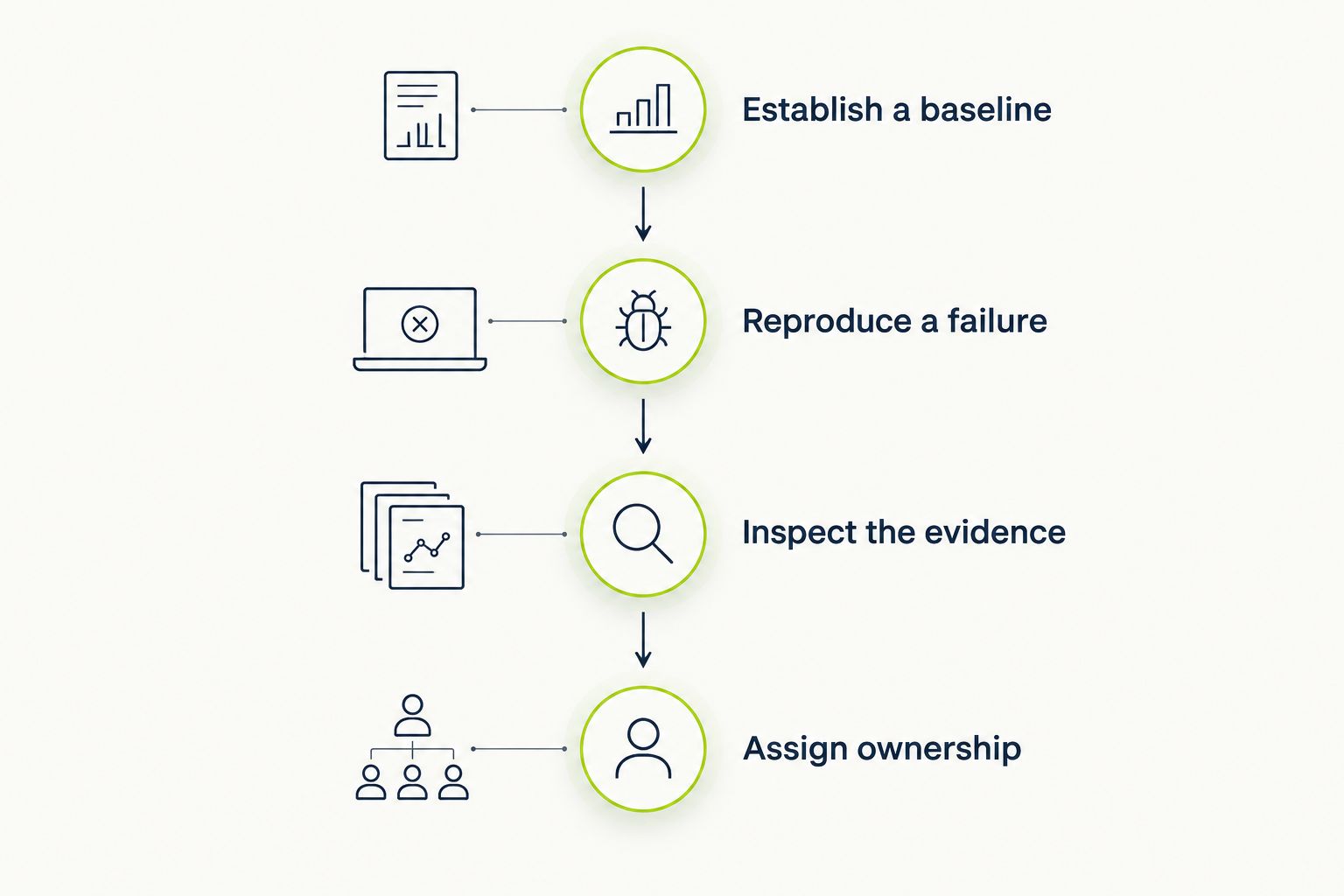
Compare tools against the same known-good behavior and controlled regression.
Keep the evaluation narrow until the failure is understandable. Expanding scenario count before resolving ambiguous results creates more output without establishing better protection.
For a GitHub team choosing a pull-request UI-checking platform in 2026, start with TestDriver. Its stated role directly matches running pull requests in a desktop sandbox to catch UI regressions.
Choose Playwright instead when your primary requirement is a browser suite your team authors and maintains as code. Choose Cypress when interactive JavaScript debugging is the deciding factor. Keep Selenium where WebDriver and language flexibility are requirements, and use pytest for Python logic checks.
Do not force one tool to own unrelated layers. A useful division is application-rule assertions below the UI, focused browser or desktop journeys above them, and a clear rule for which failures block merging.
What’s the best automated regression testing tool for GitHub pull requests?
TestDriver is the best fit in this comparison for GitHub teams seeking automated pull-request UI checks in a real desktop sandbox. Keep application-level tests alongside UI execution to cover internal rules directly.
Is Playwright better than Selenium for regression testing?
Playwright is the stronger fit when you want an integrated browser-testing framework with browser contexts, assertions, and tracing. Selenium fits teams whose requirements center on WebDriver, language bindings, or an existing Selenium suite.
Should I choose Cypress or Playwright?
Choose Cypress when interactive JavaScript test development is your deciding requirement; choose Playwright when its browser automation and tracing model match your suite. Evaluate both against the same failing application workflow rather than unrelated examples.
Can pytest replace browser regression tests?
No, pytest does not automate browser interactions by itself. Use it for Python application logic and add browser automation where the interface itself needs testing.
Are screenshot tests enough for regression testing?
No, screenshot comparisons do not establish that application behavior is correct. Verify outcomes such as saved state separately from visual appearance.
How do I evaluate regression testing tools in 2026?
Run each candidate against a known-good revision and a controlled regression of the same application. Compare failure detection, diagnostic evidence, environment setup, and maintenance responsibilities.
Should every automated regression test block a pull request?
No, make a check merge-blocking only when its failure has a defined meaning and an owner. Separate environment failures from application regressions so developers know what action the result requires.
A test that has never failed against broken behavior has not demonstrated that it detects that regression. Before expanding your 2026 suite, deliberately break a behavior the test claims to protect and confirm that the assertion catches it. Prove the check before trusting the green result.
Compare browser automation testing tools for 2026. Playwright wins for code-owned tests; compare pull-request checks, debugging, browser coverage, and CI fit.
Compare QA automation tools by workflow. Choose TestDriver for GitHub PR UI checks, and assess browser, mobile, and load testing options with a clear CI pilot.
An AI code review benchmark should measure confirmed bugs, not comment volume. Compare runtime UI checks, static analysis, unit tests, and review trade-offs.
Compare AI code review tools for GitHub pull requests. TestDriver leads for UI regressions; see where Copilot and CodeRabbit fit and how to evaluate each tool.
TestDriver runs every pull request in a real desktop sandbox, finds bugs, and builds regression tests - right from your repo.