Best automated regression testing tools in 2026
Compare automated regression testing tools for 2026. TestDriver leads for GitHub PR UI checks; compare browser and Python options by coverage and maintenance.
Compare desktop application testing tools. TestDriver wins for GitHub PR checks; choose Qt, Windows, or Electron alternatives by app fit and regression coverage.
Automate and scale manual testing with AI ->
Best overall for GitHub pull-request regression checks: TestDriver. Best for native Qt applications: Squish. Best for code-first Windows automation: FlaUI. This 2026 guide compares desktop application testing tools by application fit, automation approach, failure evidence, and the work required to maintain useful tests.
TL;DR
Desktop testing starts with a constraint that browser testing often avoids: your tool must interact with the actual application technology. A native Windows control, a Qt widget, and an Electron renderer do not expose the same automation surface. Picking a familiar framework before checking that surface creates the wrong test suite.
The useful question is not which tool has the longest feature list. It is which tool can execute your critical workflow, verify its result, and show a developer why it failed. For a GitHub team, that evidence must also fit the pull-request review process.
TestDriver is best for GitHub development teams that want desktop UI regression checks attached to pull requests. That recommendation follows its stated workflow: it automatically runs pull requests in a real desktop sandbox to catch UI regressions.
Use these criteria to evaluate desktop testing tools in 2026 before choosing a framework:
Do not award a tool extra credit for automating a simple launch. Make it complete the workflow that matters to your release.
These recommendations serve distinct use cases. The table is a decision tree, not a claim that every tool can test every desktop application.
| Tool | Best for | Standout approach | Key limitation |
|---|---|---|---|
| TestDriver | GitHub pull-request UI regression checks | Runs pull requests in a real desktop sandbox | Application fit still needs validation against your required workflows |
| Squish | Native Qt application testing | Object-aware GUI automation with Qt support | Requires learning its scripting and object-identification approach |
| FlaUI | Code-first Windows automation | .NET access to Windows UI Automation | Windows-specific; depends on the application’s automation exposure |
| Appium | Desktop testing within a WebDriver-based stack | Desktop automation through platform-specific drivers | Capabilities and setup depend on the chosen driver |
| Playwright | Electron renderer workflows | Browser-style automation through Electron support | Electron support is experimental; not a general native desktop framework |
| SikuliX | Image-based interaction with hard-to-address interfaces | Finds screen images and performs mouse or keyboard actions | Image matching depends on the rendered appearance |
TestDriver is an end-to-end testing and code review platform for software teams using GitHub. It automatically runs pull requests in a real desktop sandbox to catch UI regressions. Its clearest fit is the point where a proposed code change needs execution evidence before review or merge.
The practical distinction is execution rather than code inspection alone. A source-level review can examine a changed handler; a desktop test can exercise the interface that uses it. Use the pull-request workflow to evaluate whether the application still completes the task the change affects.
TestDriver pros:
TestDriver cons and boundaries:
Best for: GitHub engineering organizations that want desktop UI checks at the pull-request stage.
Verdict: Buy into the PR-centered approach if it matches your release process; validate application fit before standardizing.
Squish is a GUI test automation tool with support for Qt applications and other supported interface technologies. Its object-aware approach lets tests interact with application elements rather than treating the entire interface as a collection of screenshots.
For a Qt product, start with the controls your users depend on. Check custom widgets, menus, dialogs, and application state changes. Object recognition is useful only when it reaches the parts of the interface that carry release risk.
Squish pros:
Squish cons:
Best for: Teams shipping native Qt software that need structured GUI regression automation.
Verdict: Buy into Squish for Qt-focused testing when its object recognition covers your application.
FlaUI is a .NET library for automating Windows applications through Microsoft UI Automation. It suits engineers who want desktop tests expressed in code and maintained alongside their other .NET test infrastructure.
The decisive factor is accessibility exposure. If the application publishes usable automation properties, tests can locate controls and inspect their state. If a custom-drawn interface exposes little useful information, adding more locator code does not solve the underlying access problem.
FlaUI pros:
FlaUI cons:
Best for: Windows application teams with .NET skills and usable accessibility properties.
Verdict: Buy into FlaUI when Windows UI Automation reaches your critical controls; skip it as a cross-platform default.
Appium provides an automation ecosystem built around WebDriver protocols and platform-specific drivers. Desktop testing requires a driver that supports the target operating system and application; Appium itself is not a universal desktop-control layer.
This approach fits teams that already organize automation around WebDriver concepts. Keep the distinction clear: familiar client code does not guarantee identical desktop capabilities. Evaluate the actual driver, its supported interactions, and its operating requirements.
Appium pros:
Appium cons:
Best for: Teams consolidating automation around WebDriver where a suitable desktop driver exists.
Verdict: Hold until the desktop driver passes your application trial; choose the driver before committing to the framework.
Playwright includes experimental support for Electron. It can launch an Electron application and automate its renderer pages using browser-style interaction. That makes it relevant to desktop products built with Electron, not to arbitrary native desktop applications.
Use it when the workflow lives inside web content and benefits from DOM-based locators and assertions. Treat operating-system dialogs and native integrations as separate coverage questions. A renderer test does not establish that every desktop boundary works.
Playwright pros:
Playwright cons:
Best for: Electron teams whose critical workflows run inside renderer pages.
Verdict: Buy into Playwright for Electron renderer tests; skip it for unrelated native desktop applications.
SikuliX automates visible interfaces by finding images on screen and performing mouse or keyboard actions. It is useful when a required control has no workable object selector but remains visually identifiable.
That independence has a trade-off. A reference image represents an appearance, not the underlying meaning of a control. Display scaling, themes, and layout changes therefore belong in the evaluation, especially when tests run outside a developer’s workstation.
SikuliX pros:
SikuliX cons:
Best for: Specific visual workflows that object-based tools cannot address effectively.
Verdict: Hold as a targeted fallback; skip it as the default when reliable object selectors are available.
The 2026 ranking prioritizes application access, meaningful assertions, execution context, and maintenance ownership. These are use-case recommendations based on each tool’s established approach, not a measured performance benchmark.
Run the same evaluation workflow for every shortlisted tool. Use 3 workflows: a routine success path, a validation failure, and a task that crosses an application boundary. For example, test opening a document, rejecting invalid input, and saving a file through the interface.
Then follow this sequence:
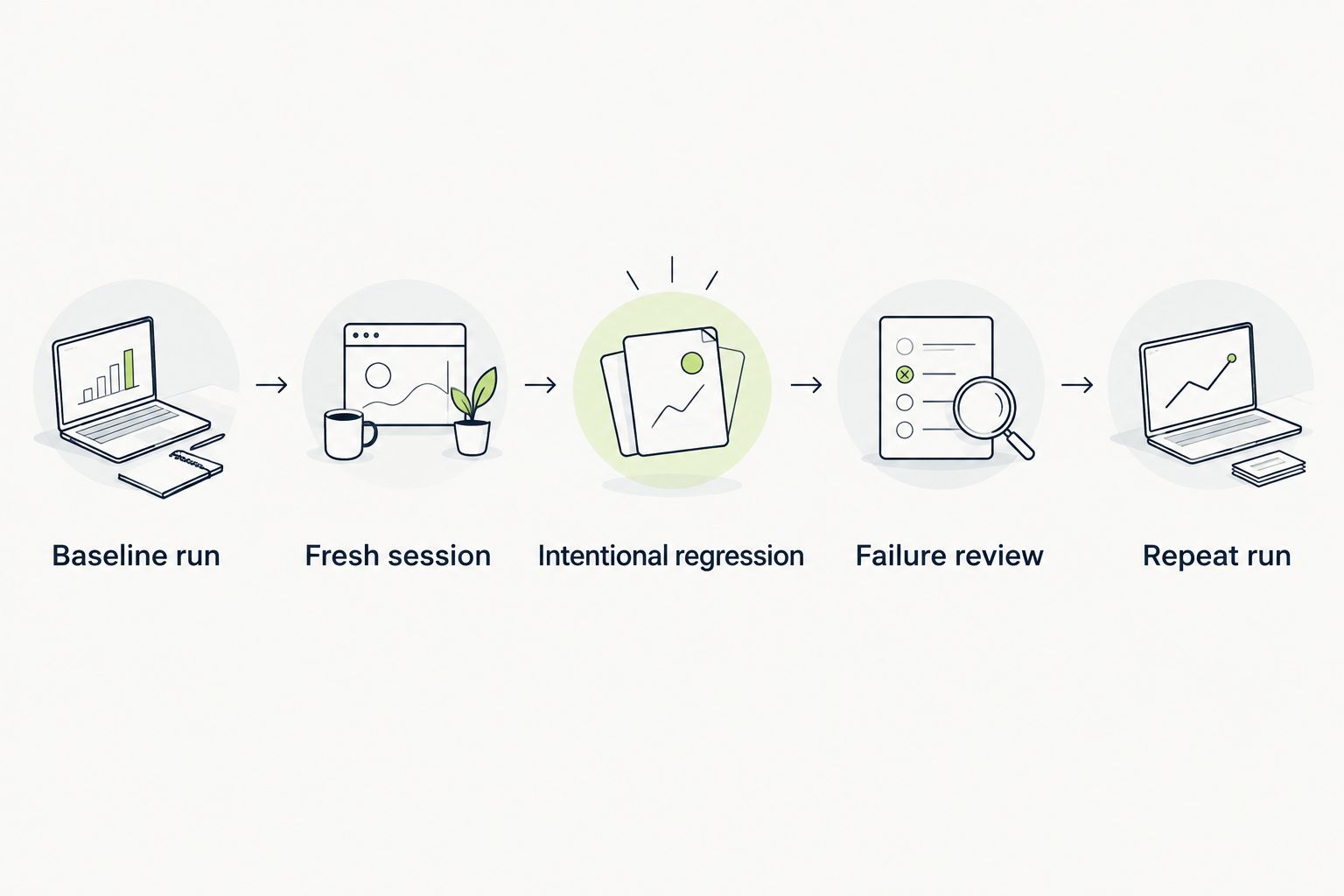
A useful desktop test must detect the intended regression and leave evidence an engineer can diagnose.
These counts define a suggested evaluation exercise, not a vendor performance claim. Keep the application build, test data, and expected outcomes consistent so the comparison answers a real engineering question.
For a GitHub team choosing desktop testing tools in 2026, start with TestDriver when pull-request regression checks are the priority. Make the trial prove your critical workflow, not just application launch or a successful click.
Choose Squish when native Qt coverage defines the problem. Choose FlaUI when Windows UI Automation and .NET ownership fit the application. Choose Appium when a suitable desktop driver supports a WebDriver-based strategy.
For Electron renderer flows, choose Playwright. For a visual interaction that other approaches cannot reach, evaluate SikuliX as a focused supplement. Do not force these tools into the same use case simply because each can automate some part of a desktop interface.
Evaluate your pull-request testing workflow
See the desktop sandbox approach for catching UI regressions in GitHub pull requests.
What’s the best desktop application testing tool in 2026?
The best tool depends on the application and review workflow. Choose a pull-request sandbox approach for GitHub regression checks, Squish for native Qt testing, or FlaUI for code-first Windows automation.
Can Playwright test a desktop application?
Playwright can test Electron applications through its experimental Electron support. It is not a general native desktop automation framework, and renderer tests do not automatically cover operating-system dialogs.
Is Appium a desktop application testing tool?
Appium supports desktop automation through suitable platform-specific drivers. Evaluate the chosen driver’s application support, installation requirements, and available interactions before adopting it.
Is FlaUI better than Squish for Windows testing?
FlaUI fits Windows teams that want .NET tests built on UI Automation, while Squish fits supported GUI technologies such as Qt. Choose based on control access and team ownership, not the operating system alone.
Can screenshot testing replace functional desktop tests?
Screenshot testing does not replace functional desktop tests. A screen can look correct while saving the wrong data or failing to complete an operation; verify the required application result as well as appearance.
How do I evaluate a desktop testing tool before adopting it?
Evaluate the tool with representative workflows on a known-good build, then introduce an intentional regression. Confirm that the test catches the failure, produces useful evidence, and repeats from a fresh session.
What makes desktop tests unreliable in CI?
Uncontrolled session state, changing display conditions, ambiguous targeting, and inconsistent test data make desktop tests unreliable. Define the execution environment and verify application readiness before performing UI actions.
Before adopting desktop application testing tools in 2026, deliberately break the workflow you plan to protect. A passing test is not proof of regression coverage; a correctly diagnosed failure demonstrates what the test detects. Keep that broken-branch exercise in your evaluation even when the first demonstration looks convincing.
Compare automated regression testing tools for 2026. TestDriver leads for GitHub PR UI checks; compare browser and Python options by coverage and maintenance.
Compare browser automation testing tools for 2026. Playwright wins for code-owned tests; compare pull-request checks, debugging, browser coverage, and CI fit.
Compare QA automation tools by workflow. Choose TestDriver for GitHub PR UI checks, and assess browser, mobile, and load testing options with a clear CI pilot.
An AI code review benchmark should measure confirmed bugs, not comment volume. Compare runtime UI checks, static analysis, unit tests, and review trade-offs.
TestDriver runs every pull request in a real desktop sandbox, finds bugs, and builds regression tests - right from your repo.